Showing posts with label web design. Show all posts

Tuesday, 12 February 2013

Top Best Blogging Platforms


Web-Based
Price: Free, costs to upgrade with $5 per month
Alexa Traffic Rank(Global Rank): 22   Traffic Rank in US: 27

It is an open-source blogging platform & the most popular blogging platform in the world. WordPress offers two different blogging platforms: WordPress.com and WordPress.org. The main difference between the two is that the WordPress.com sites are hosted on WordPress’ server while WordPress.org sites are hosted on an external server.
It has a limit for the free service so we've to upgrage it. If you want your own domain name, Wordpress.com will  sell it to you for $17 per year.


Web-Based
Price: Free
Alexa Traffic Rank: 44   Traffic Rank in IN: 14
It is owned by Google and so it is integrated with some Google Accounts and mostly adding Google products or widgets to your blog. It’s easy to edit and publish posts and it has a tons of built-in tools. Blogger now offers the option to let you buy a unique domain name (not "blogspot.com") for a bargain price of $10 per year.


Web-Based
Price: Free
Alexa Traffic Rank: 32   Traffic Rank in US: 18


It is often known as a "microblogging" platform because the style of blogging here is focused on short and frequent posts. Tumblr's blogging platform focuses more on Fashion and Styling. It's look & feel is so elegant and excellent.


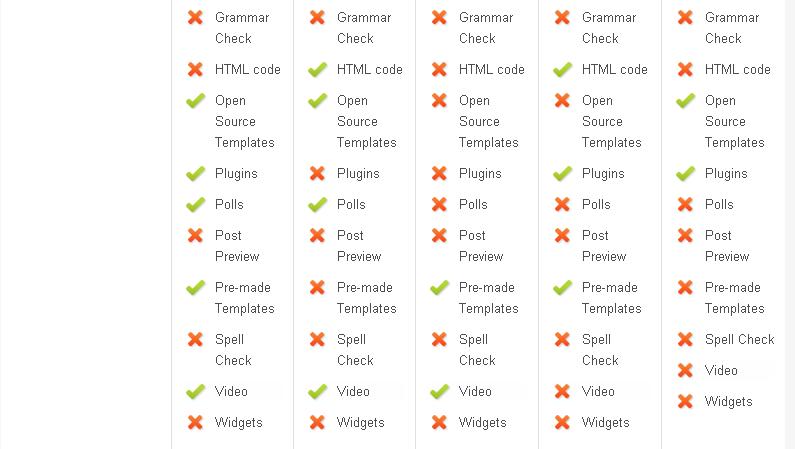
Comparisons of various Blogging platforms :


Tuesday, 6 December 2011

3 keys for web design


With the huge amount of web browsing done these days, a web designer can’t afford to let their viewers leave their website due to bad design. A well built website should have 3 key elements that help viewers find what they are looking for. These keys are structure, usability, and content. Using these three keys will help web designers create a well designed website every time.

Structure

The idea behind having a well structured website is to help the viewer quickly find what they are looking for. The information super highway does not afford badly designed websites to attract and maintain viewership. There are many properties contained within the structure of a website.
Spaces and Shapes
The foundation of good structure is utilizing spaces and shapes which contain the majority of content within a website, as well as mold the website into a logical form. Choosing one shape as a template to structure the entire website is good practice. In other words, if rounded borders are to be used on some of the tables, they should be used on all of the tables. In fact, they should be the same radius as well. The reason being, according to author Lilian Garret, “The more clearly the forms follow a regular and predictable pattern, the more we see them as single, unified groups” (Garrett). Spacing is also important in the structure of a website. Lilian Garret also says, “The nearer visual elements are to each other, the more we tend to group them together” (Garrett). In the example of a blog, each post should be adequately spaced apart from another post, while the body of each post, should be closer together.
Colors
Colors also help distinguish the content of a website. A good rule of thumb is to use two contrasting color palettes and one neutral color. The two contrasting colors are for the body background and the body text (keep in mind if viewers are going to be spending time on reading the content of the website: it is easier to read black text on a white background than it is to read white text on a black background). Neutral colors are great for navigational menus, or supporting a background color. Having a white background and using light blue tables to hold the content of a page would be an example of having a neutral color supporting a background color.
Paragraph Properties
Setting the proper paragraph properties of a website is another element to providing great structure. Paragraph properties include font face, font size, line spacing, and letter spacing. By default, internet web browsers have already done most of the work for us and will use the most reader friendly fonts. Stay away from using artistic, decorative fonts, unless they are large. According to fonts.com, “decorative type faces can detract from the communication process”.
Rhythm
The last element of having good website structure is rhythm. Every page on a website should look and feel the same. Every page should flow from left to right and from top to bottom with the most relevant information in the top left, drawing down to the least relevant at the bottom right. The most important information can be centered in the middle of a web page if there is adequate spacing around it. An extreme of example of this would be Google.com.


                               Usability

Usability is defined as the ease of navigating and finding information on a website. There are three elements or ways of having good usability.
Site Map
The first is having a site map. Site maps are important navigational pages that display all of the important and relevant links on an entire website. It’s important to note that if a website has a lot of links, the site map should have categories with drop down menus. This way the site map will always look neat with little clutter of information which might be of no use to a viewer. It’s also important to remember that a site map doesn’t have to include every page on a website, in fact sometimes it is better to leave out some links. A good practice is to leave out links that would have no benefit to someone viewing the website.
Search Bar
A search bar is another element that would increase a website’s usability. If a viewer knew exactly what they wanted from a website, they would be able to type it in the search bar instead of having to navigate around the website or the site map.
Navigation Menu
The last, but most important element of a website’s usability is the navigation menu itself. Links in a navigation menu should be categorized by relevancy of other web pages. If a website has a lot of links, it might want to use drop down menus. Drop down menus are a great way of organizing and categorizing web pages. Drop down menus can be used with horizontal navigation menus as well as vertical menus. For lots of links, it is recommended to use a vertical navigation drop down menu. Amazon.com is a great example of a clean vertical navigation drop down menu.

                              Content


With good structure and good usability, great content is on the way. Make use of paragraph and header tags. Place headers in logical order from h1, down to h6. The h1 tag is generally static and takes on the name or overall theme of the website. The h2 through h6 tags should be used for titles of paragraphs and sub titles of paragraphs respectively. If a website has a lot of fresh content appearing regularly, a good method to handle it is by having a header tag with a small abstraction of the fresh content. When designing the website, keep the content in mind. When a new viewer visits a website, they should know what the website is about without having to scroll. Clearly defined titles and short descriptions in the top two to three inches of a website will let new users know what the website is all about.
After using the three keys to create a great web design all that is need is email hosting,correct grammar, creative writing, and interesting graphics or pictures explaining your website.

Friday, 2 December 2011

Tips For Professional Web Design


Regardless of whether you are an amateur or even an expert designer, there are particular fundamental guidelines that need to be followed so that your site visitors retain coming back.


1. Prevent splash screens
Utilizing splash screens will make your internet site appear different, but if you would like your site visitors to be content, usually do not contain a splash page on your website. Such websites are annoying to the finish user, which may possibly stop your site from becoming indexed by research engines.


2. Be Consistent
Just as any brochure, newsletter or newspaper is formatted in desktop publishing program, all graphic images, headings and footers must continue to be consistent all through your web site. In particular, Color coded internet pages demand consistency.


3. Prevent Animations
Do not do very much animated element s within your site. A website must not have too very much moving parts because it becomes confusing and not informative.


4. Steer clear of Web browser particular functions
Should you insert most recent moving graphics within your website it may possibly function only with one web browser and then you definitely must set a phrase “Best viewed with….. Browser.” If your site is visible only in certain web browser you could turn your would be visitors into alienate at the same time they may they might consider you do not like their favored web browser. Numerous individuals do not know to change their web browser version so if they can’t see your site in their browser, they won’t see your internet site. Check your site in all possible browsers like Internet Explorer, Netscape and Firefox etc so that individuals can view your site. Furthermore, there are numerous versions of browsers inside each and every sort, to ensure that I.E. 7.0 does not render internet pages necessarily the same as I.E.6 does.


5. Take into account Navigation
Poor navigation just isn’t efficient for sites. 1 crucial factor to think about is net users should be capable to access all the pages of your internet site from each web site.


6. Consider Coloring
Make certain to create the lightness differences between foreground and background colors really pronounced, regardless with the coloring you pick.


7. Create Balanced Articles
Stability your articles inside a web page by avoiding centering the crucial components of a web page or displaying them off-balance. Picture that the web page is divided into 3 portions in each horizontal and vertical directions.


8. Consider usability
-> Make certain your site is downloaded inside 8 seconds max.
-> Beware of cutting-edge engineering
-> If you’ve relocating photos in your site it may possibly affect the human vision.
-> Limit your frames
-> Your scrolling needs to be quick and horizontal scrolling ought to be avoided.
-> Always pick a web address which is simple to bear in mind and is brief.
- > Make sure your get in touch with information is inside the front web site.

Tuesday, 9 August 2011

The Best Ways Of Accomplishing Web Development Projects


  •   Having a complete knowledge about the web development is significant if you are seeking for effective web development service. With a basic knowledge about web development, you will be able to understand what all it includes, what you can expect out of your hired web developer and quantify what are you getting in return of the payment you are making. When you have understood the premise of the development process, you can smartly make analysis about the duration your website development project will take and how soon it can go live. 
  • There are too many things for a rookie to know about web development. Below mentioned are the things one should know: Know your needs: The first and the foremost thing is to know your requirements. What kind of a website you are looking for? Do you have anything in your mind that you can ask a web developer to incorporate in the website you intend to get design and developed? What colors, theme or layout you need?These are the basic questions that a web developer or a company asks a service seeker. Therefore it is significant for a client to have not thorough but basic information when planning to seek web development services.
  • Planning:-Web Development begins with planning. This is the primary phase wherein all the information is stored. A part of the information can be gained from the client while rest is acquired from researches that are conducted. A web developer loves to know more about the kind of website they will be working on, the audience that is being targeted, the content that needs to be placed on the website because web development includes all these. The process of planning involves much interaction between the web developers and client. This means that clients should be satisfied that a developer has understood what they expects and a web developer tries to meet it. Execution of ideas: This is the step where the thoughts are given the shape of action. 
  • The plan is then began to execute by designing the architecture of the website which is called Layout. Sitemap and navigation of the website follows. Also content is included in the website so as to keep the process going. Further client is consulted to make sure that the elements or stuff that has been integrated in the website is liked by client or need some modifications?
  • Development in process: -It is after this that the development of the website take pace. After analyzing the clients needs and areas that need to be replaced or amended, development takes swing.Content is placed in their respective areas, desired applications are installed, and navigational links are integrated. The chosen graphics or images are fixed in mentioned places while making sure that they are not stuffed. It is that this point of time that the website is hosted and is thoroughly viewed by the client. And the client can ask for modification, if they feel there is a need. 
  • Site Activation: This is the final step in the whole development process. Site is finally activated to be made live on the web and then checked if they it is running properly on the search engines. Not forgetting that registration of domain and website hosting are the prior steps. In a nutshell, one should follow the above mentioned steps to get designed a superior website wherein client has shared inputs of how he needs a website and what best can be done to make it search engine friendly and that it attracts more visitors.
  • Ethan Dao is the Managing Partner of a Web design Company New York, MNM LIT that aims at developing multiple partnerships for enhancing company portfolio. The jointly affiliated company assures to provide new york web design, and web maintenance services at competitive rates.

Monday, 8 August 2011

All About Large Website Backgrounds


  • With the changing trends, we have witnessed a dramatic change in the way backgrounds were selected for a website. Traditionally, it was simply colors or themes that was used on a website which was later replaced by big backgrounds. Large backgrounds as tested gives a high and classy visual impact to the websites. A creative web designer can perhaps play with the art created by the photographers, for instance a picturesque landscape or a wonderful catchy portrait. Huge backgrounds can also be large illustrations and in some cases a video.
  • Although, there are varying styles that are used by the web designers; however the most common ones are photographs, illustrations or graphics and animation as backgrounds. It is the animated style that is just used for experimentation, but with Internet becoming faster and bandwidth cheaper, many websites can afford to use these. Without doubt, the most common thing that web designers face with big backgrounds is that they have to be conformed to the screen resolution. 
  • It is imperative for a web designer to test the website using different screen resolutions in order to refrain from the fallouts. And an ideal way is to check the website on window widths of different browsers. No matter, how safely you play, but there are few mistakes that tends to evolve when using large backgrounds. Below mentioned are some of the mistakes that a web designer must hold back from doing: 
A. 
  1. Centered, Scaled or Tiled Images: It is not a bad idea to place images in center, title or scaled manner as a background. It is also recommended to maintain the symmetry of the website. Overusing these techniques will certainly end up in the development of a poorly looking website.  Centered: Make use of the images that blends perfectly with the background so that users having high screen resolutions should not notice it. 
  2. Title: If you are willing to title the image, keep in mind that the image edges are consistent with a particular pattern, thus developing a website with a seamless background. 
  3. Scaled: The most significant factor that must be kept in mind while scaling an image for a website is the quality of image and target resolution. A creative web designer should use varying formats that are usually optimized for image style. 
B. Impact on Bandwidth and Performance: The larger background equals big files that can create an       impact   on bandwidth and thus user experience. Bandwidth is generally the data that is transferred from one place to other, particularly from server to a client. With the use of large graphics, the loading time website takes increases to a great extent. This calls for a need of image optimization using proper image format or resolution along with other resources such as JavaScript or CSS.
  • Conclusion: High resolution websites should not all that you should consider when designing a website. Small screen resolutions must be given equal weight age due to the fact that a high resolution website will not be compatible to the mobile phones. With a growing demand of Mobile browsing, a website with high resolution will turn out to be a fiasco. Maneet Puri is the managing partner of a partnership venture group, MNM LIT. With a mission to serve US clients in a exclusive way, this new york web design company assures to provide creative web design, web development and web maintenance services ny services at rare to be found rates.